Evaluating the Bow Clip Art Set for Design Projects
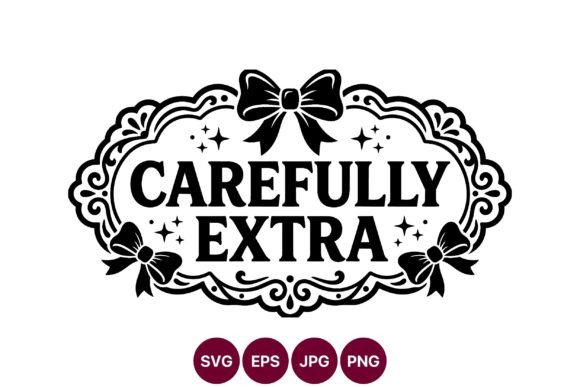
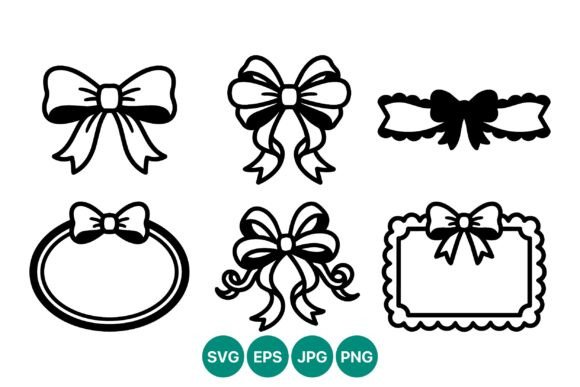
In the realm of digital design, the availability of high-quality assets often dictates the efficiency and aesthetic outcome of a project. The Bow Clip Art Set represents a specific category of resources designed to streamline the creation of decorative elements. This collection consists of black and white vector graphics featuring bows, ribbons, and decorative frame components. For designers, illustrators, and content creators, understanding the utility, technical specifications, and limitations of such a set is crucial before integrating it into a workflow. This evaluation explores what this resource offers, where it fits best within a design strategy, and how it compares to alternative approaches.
Understanding the Asset Composition
The core value of the Bow Clip Art Set lies in its format and visual style. Unlike raster images that lose quality when enlarged, this collection is built on vector technology. The download package typically includes a ZIP folder containing files in SVG, PNG, JPG, and EPS formats. This multi-format approach provides flexibility, allowing users to choose the file type that best suits their specific software environment or output requirements.
Visually, the artwork is defined by a high-contrast, black-and-white palette. This monochromatic scheme is not merely an aesthetic choice but a functional one. High contrast ensures that lines remain distinct and recognizable regardless of the background color they are placed upon. Because the assets are 100% vector-based (specifically in SVG and EPS formats), they offer infinite scalability. A bow intended for a small social media icon can be scaled up to cover a billboard without any loss of sharpness or pixelation. This characteristic makes the set particularly valuable for projects requiring versatility across different mediums.
Why Designers Seek Vector Ribbon Collections
There are several practical reasons why a professional might evaluate this specific clip art set. First, time efficiency is a primary driver. Creating complex ribbon textures, realistic folds, and symmetrical bow shapes from scratch requires significant time and advanced illustration skills. By utilizing a pre-made Bow Clip Art Set, designers can bypass the tedious drafting phase and focus on composition, layout, and overall concept development.
Secondly, consistency is often a challenge in large-scale branding or stationery projects. When multiple team members are working on a suite of materials—such as wedding invitations, packaging labels, and marketing brochures—using a unified asset library ensures that every element maintains the same line weight, style, and proportion. The black and white nature of this collection further aids in brand consistency, as these elements can easily be recolored to match any brand guideline without compromising the integrity of the original vector paths.
Technical Advantages of the Included Formats
- SVG (Scalable Vector Graphics): Ideal for web design and responsive interfaces, ensuring crisp rendering on all screen sizes.
- EPS (Encapsulated PostScript): The industry standard for print production, compatible with major desktop publishing software like Adobe Illustrator and InDesign.
- PNG: Useful for quick previews or situations where transparency is required but vector editing is not necessary.
- JPG: Suitable for email distribution or low-resolution web use where file size is a concern.
Benefits and Strategic Tradeoffs
Adopting the Bow Clip Art Set offers distinct benefits, primarily centered around speed and technical reliability. The ability to scale vectors infinitely eliminates the risk of blurry edges in print, a common issue with lower-quality raster downloads. Furthermore, the inclusion of decorative frame elements alongside the bows allows for more comprehensive layout solutions. Designers can create cohesive borders, corner accents, and central focal points using a single, stylistically consistent toolkit.
However, there are tradeoffs to consider. The most significant limitation is the stylistic constraint. Because the set is strictly black and white and high-contrast, it may not suit projects requiring soft gradients, photorealistic textures, or subtle shading out of the box. While vector files can be colored, adding depth and dimension to flat silhouettes requires additional manual work. If a project demands a hyper-realistic silk ribbon effect immediately, this set may require significant post-processing to achieve that look.
Additionally, the "clip art" aesthetic can sometimes feel generic if overused. Without customization, these elements might appear similar to designs produced by others using the same library. To mitigate this, designers must be willing to manipulate the vectors—altering line weights, combining shapes, or adjusting proportions—to create a unique final product.
Ideal Use Cases for the Collection
This resource is a strong fit for specific scenarios where clarity and scalability are paramount. It excels in:
- Print Stationery: Wedding invitations, greeting cards, and business letterheads often benefit from elegant, scalable line art that prints cleanly on various paper stocks.
- Web and UI Elements: The SVG format makes these bows perfect for website decorations, badge icons, or promotional banners where load speed and resolution independence are critical.
- Monochrome Branding: Brands that utilize a stark black-and-white identity will find the high-contrast nature of these assets aligns perfectly with their visual language.
- DIY Craft Projects: For users cutting vinyl or paper with machines like Cricut or Silhouette, the clean vector paths ensure precise cuts without jagged edges.
When to Consider Alternatives
Despite its strengths, the Bow Clip Art Set may not be the optimal choice for every situation. If a project requires a highly stylized, hand-drawn aesthetic with irregular line weights, a custom illustration might be more appropriate. Similarly, if the goal is to depict specific fabric textures—such as satin sheen, velvet fuzz, or tulle transparency—a vector silhouette may fall short without extensive texturing work.
Furthermore, if the design context involves complex layering where semi-transparent overlays are essential, the solid black nature of the default artwork might necessitate significant adjustment. In cases where budget allows for bespoke work, commissioning a custom illustrator could yield a more unique result that avoids the potential "stock image" look associated with clip art libraries.
Decision-Making Insights
Before downloading or purchasing, potential users should assess their project requirements against the capabilities of the set. Ask yourself: Does my project require infinite scalability? Is a high-contrast, graphic style acceptable or preferable? Do I have the tools and skills to edit vector files if customization is needed?
If the answer to these questions is yes, the Bow Clip Art Set presents a practical, cost-effective solution that balances quality with convenience. The inclusion of multiple file formats reduces friction in the workflow, ensuring compatibility with both print and digital environments. However, if the project demands immediate realism or a highly unique artistic voice, investing time in custom creation or seeking a more specialized texture library might yield better results.
Ultimately, the value of this collection depends on how well it integrates into your broader design ecosystem. Used strategically, these vector bows and frames can elevate a project's professionalism while saving valuable production time. Used indiscriminately, they risk resulting in a generic appearance. Careful evaluation of the specific needs of your design project will determine whether this set serves as a powerful tool or merely a placeholder.